
Start practice without renting a tick pack
This page is the data bill, not a shortlist of alternatives.
Direct answer
The bill splits in two: a Windows license, then the history pack. Trading Heroes will push NakedMarkets, Forex Tester’s own blog will push Forex Tester Online, and plugin vendors will say you should not learn a second app. The license, the data plan, and the cells we lose are on the Forex Tester selection page.
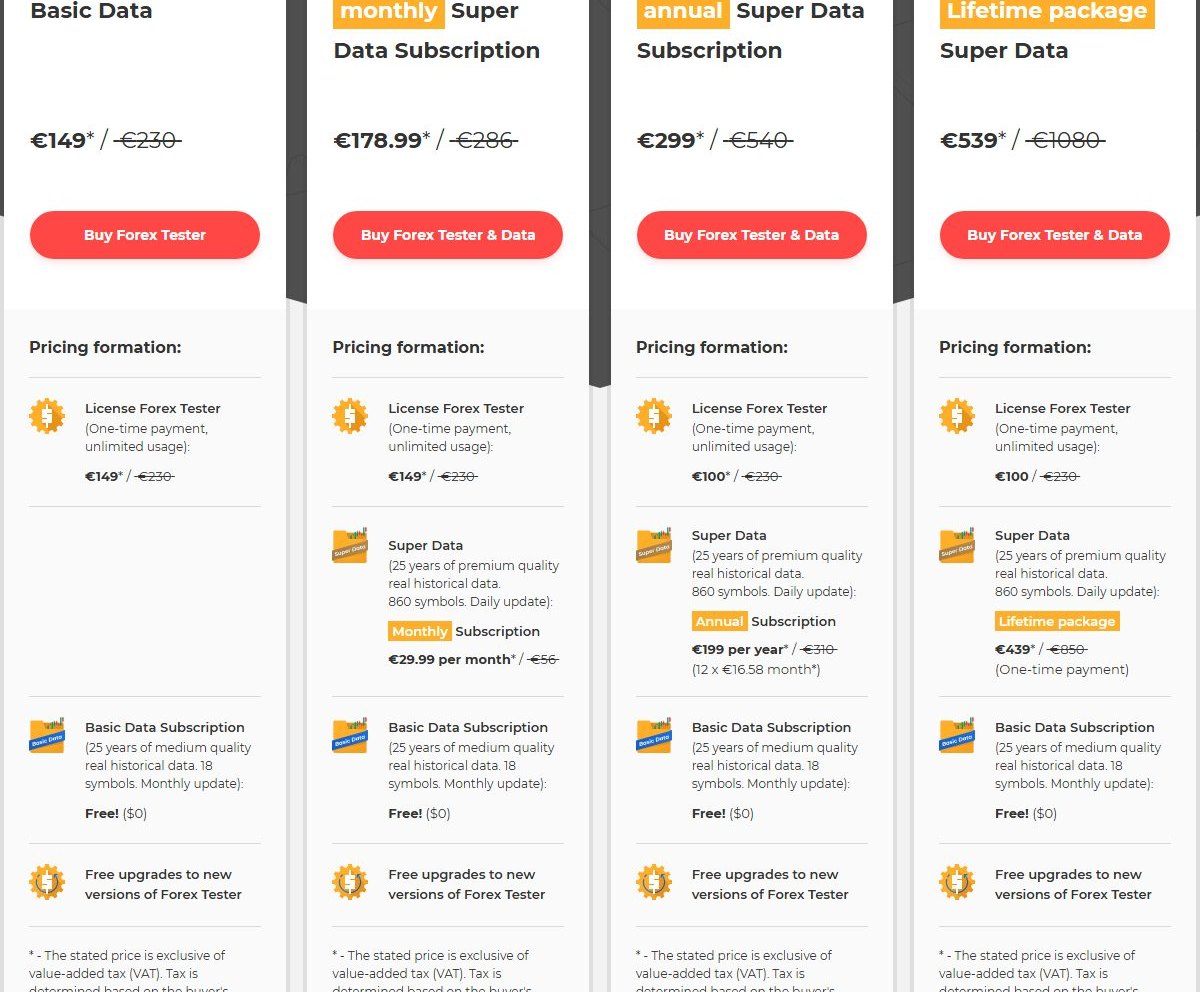
Forex Tester Desktop is a mature Windows manual-backtesting IDE (public order page still sells it while a banner steers newcomers to FTO). On 2026-09-18, desktop.forextester.com/order (https://desktop.forextester.com/order) showed promo bundles such as Basic Data $149 (from $230), monthly Super Data $169 (license plus $30/mo data), annual Super Data $299, and lifetime Super Data $469, marked ex-VAT. Deep tick depth is a paid data stack, not the Basic card alone.
BarionQuant is a local Windows training desk. You sign in to us, pull practice data, run a session on the machine. A paid seat includes the replay handbook. Free starts at EURUSD. We do not ship Mac, browser replay, or a 20-year official tick pack. We are not a broker.
Stay with Forex Tester if vendor history and a heavyweight backtest IDE are the job. Leave if you want a method seat you can start for $0, without renting Super Data to feel “serious.”
How to judge
Three questions. Answer them before you compare button chrome.
1. Are you buying data depth, or a place to rehearse decisions? Forex Tester’s honest moat is history and tooling around it — Basic vs Super Data, symbol counts, update cadence. If “23+ years / tick / hundreds of symbols” is why you opened the tab, we lose that cell on purpose. We will not invent a matching archive.
BarionQuant’s moat is a training loop: local session, then a handbook on the same seat. Pricing says “Subscription includes the replay handbook.” There is no separate course SKU.
2. Desktop IDE, browser SaaS, or a smaller training window? Forex Tester Offline/Desktop is a full Windows IDE. Forex Tester Online is their browser line — the order page itself calls Desktop the “old version” and points to FTO. FX Replay and similar sit in that browser lane too.
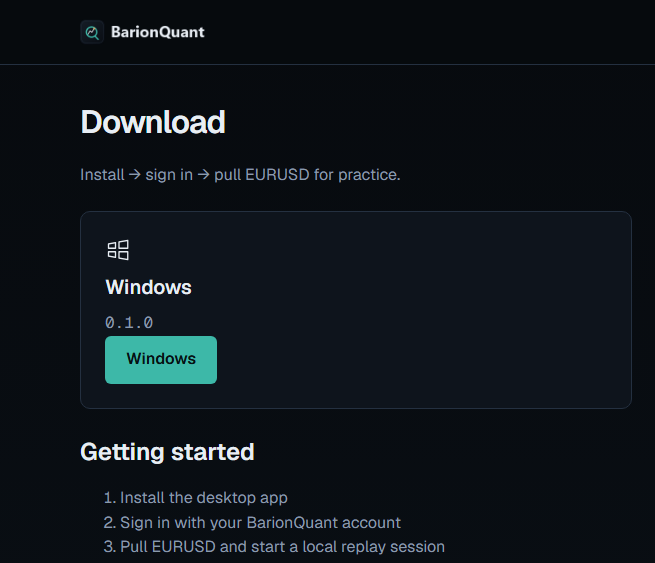
BarionQuant is a dedicated Windows window, not a tab and not MetaTrader. Download is install → sign in → pull EURUSD. No Forex Tester license field. No broker account field.
3. Does the invoice include a method layer, or only software + data? Forex Tester sells software, data tiers, tutorials, and a long community. That is real. It is not the same claim as “the seat is a structured handbook IA.”
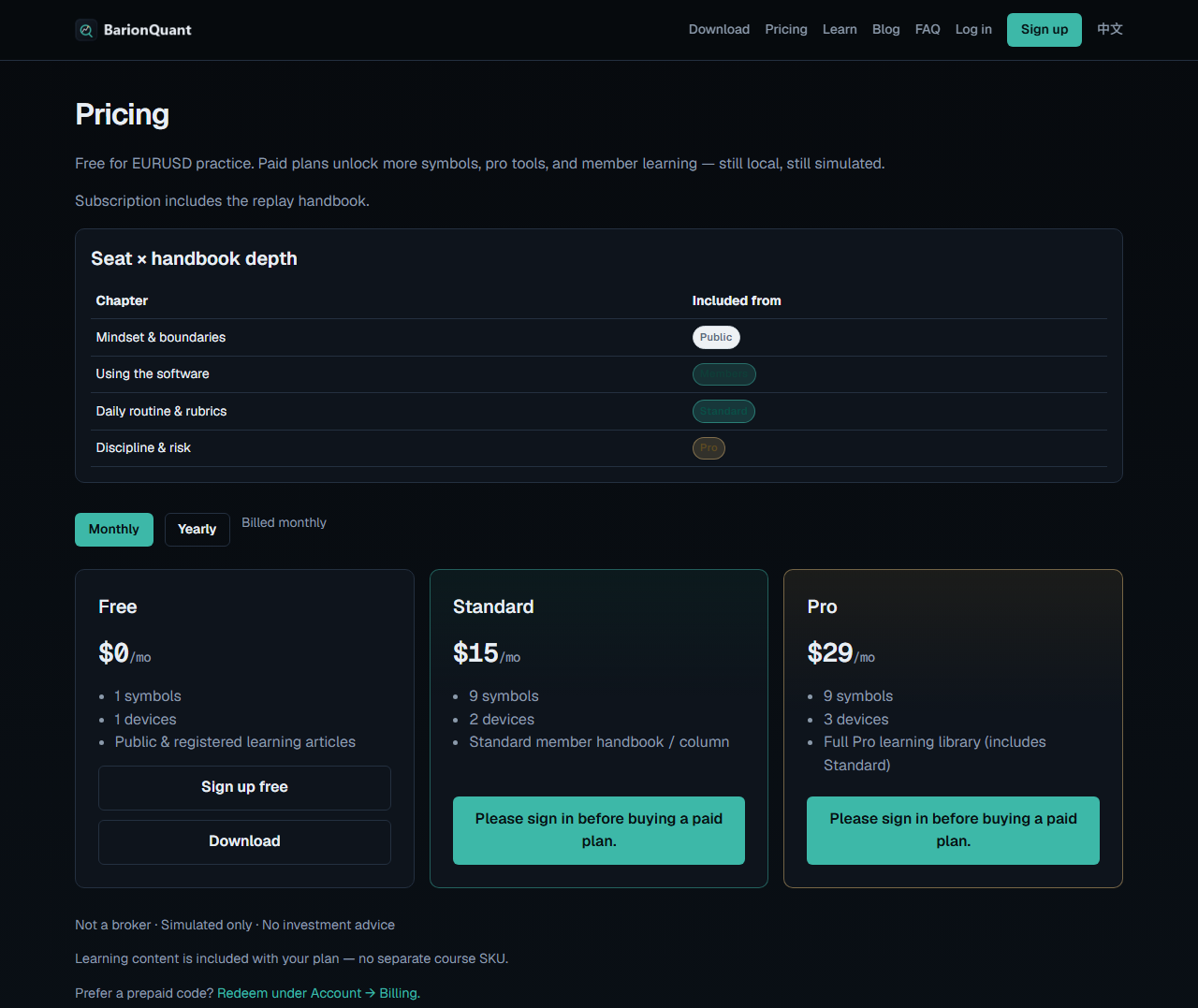
We sell seats where handbook depth rises with the plan (Public → Registered → Standard → Pro on the live Pricing table). Methods first; the desktop is the gym floor.
Forex Tester without paying for tick data
Forex Tester's deep tick history sits on a paid data pack, not on the Basic license card alone. The Desktop order page on 2026-09-18 listed Super Data stacks on top of the software.
BarionQuant does not sell a 20-year official tick pack. Free practice starts on EURUSD. The current public build is Windows, and more platforms are planned. If tick depth is the requirement, stay with Forex Tester and pay for that data.
What we do
I treat the site as a method shelf and the desktop as the gym. That is positioning B: practice system first, software as the training desk.
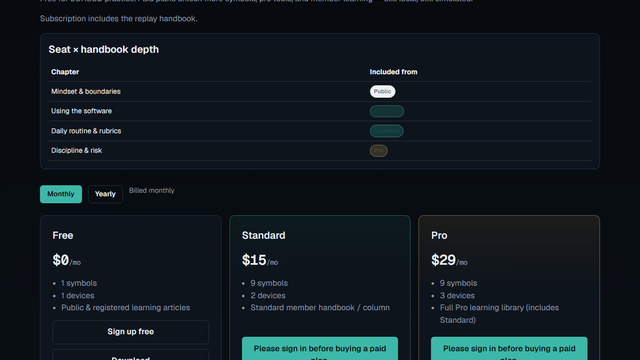
On 2026-09-18 the anonymous Pricing page showed Free $0/mo, Standard $15/mo, Pro $29/mo, plus the handbook line and the seat×chapter table. Those monthly figures match the 2026-09-14 public freeze ($150/yr / $290/yr on the Yearly toggle — verified on the same URL; not printed on the monthly PNG below).
Free is EURUSD practice. Paid seats add symbols, devices, and handbook depth. Learning is included with the plan. Nobody asks for a broker deposit.
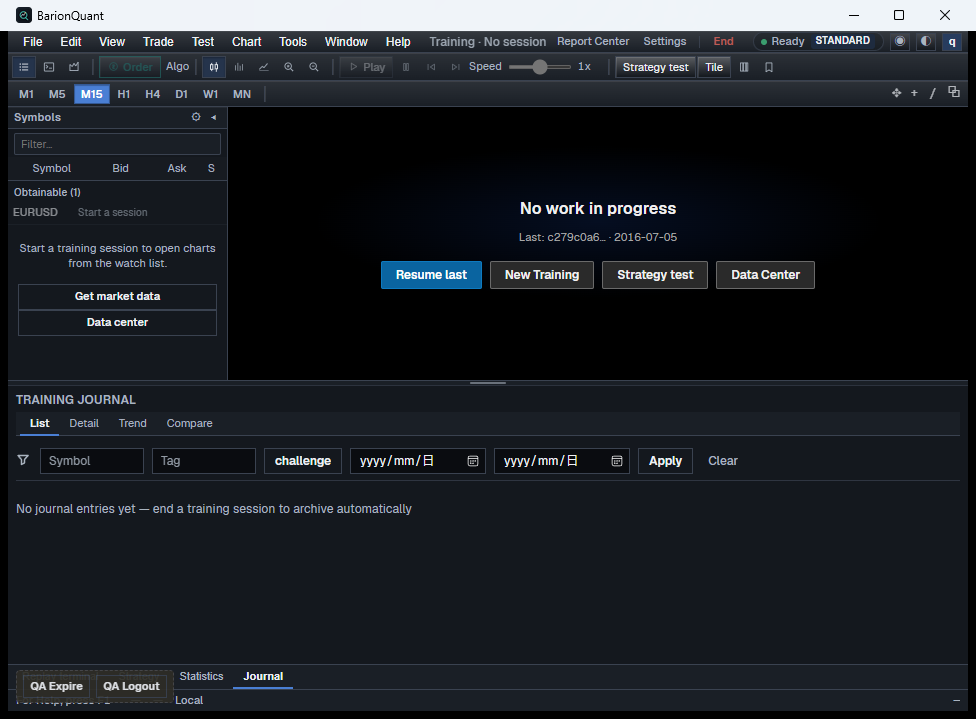
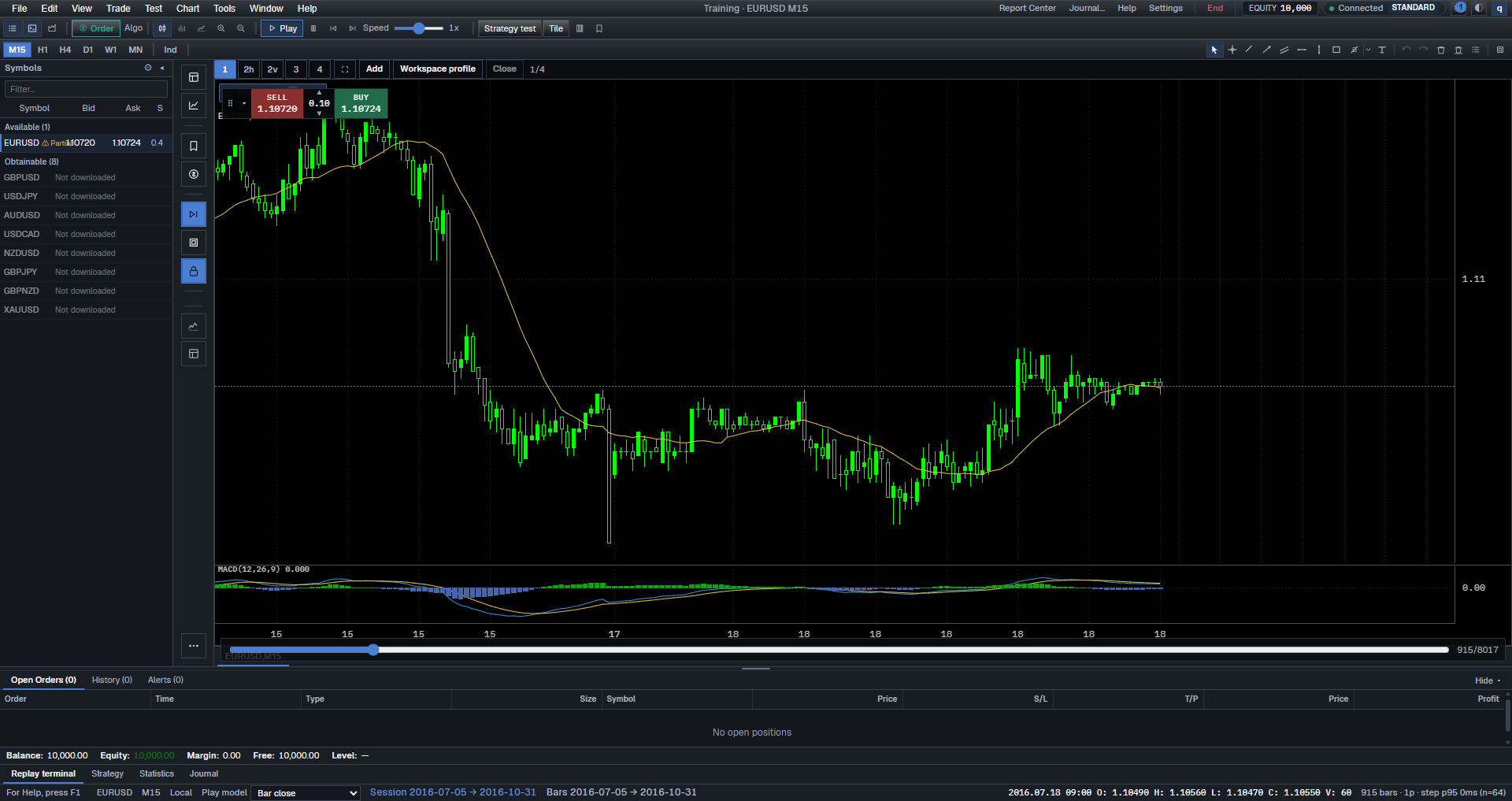
I can open BarionQuant as its own Windows window. The QA capture is an empty desk: EURUSD on the watchlist, New Training, Data Center, and a QA expire/logout strip. That strip is dev chrome, not a store installer. A Lab chart capture shows EURUSD M15 with a replay bar. On-chart Buy/Sell there is paper simulation, not a live ticket.
Calendar shorthand “$159 vs $150” only fits a rough FTO Starter-year vs Standard-year conversation. Desktop + Super Data total cost of ownership is higher than the $149 Basic card. Say that before you compare us to “$149 forever.”
Sibling forks: leave a MetaTrader plugin → Soft4FX alternative. Leave TradingView Bar Replay → TradingView vs a local desk.
Legal boundary: Not a broker: training-tool boundaries.
Honest comparison
As of public pages on 2026-09-18. Forex Tester cells cite their Desktop order page; prices move with permanent-looking sales — re-check the URL.
Form — Forex Tester Desktop: Windows backtesting IDE. BarionQuant: standalone Windows training desk.
Data — Forex Tester: Basic (medium / limited symbols) or Super Data tick stacks (extra cost). BarionQuant: local sessions; no 20-year official tick pack. Open 1-year benchmark packs + direct 1-click Binance crypto downloads.
MetaTrader bind — Both: no. BarionQuant unlocks with a BarionQuant login only.
Public price (promo · ex-VAT on FT order cards) — Forex Tester: Basic $149; Super Data stacks $169 / $299 / $469. BarionQuant: Free $0 · Std $15/mo or $150/yr · Pro $29/mo or $290/yr.
Platform — Forex Tester: Windows; Mac ≈ VM. BarionQuant: Windows only; no Mac; no browser replay.
Blind Evaluation — Forex Tester: No native blind replay mechanism; historical dates and symbol tickers remain visible during manual setup. BarionQuant: Built-in Blind Mode with random segment slicing and masked tickers/dates for zero hindsight bias.
Crypto & Multi-Asset — Forex Tester: Requires costly Super Data VIP subscription tier for multi-asset and crypto feeds. BarionQuant: Native offline replay for 9 FX/Gold pairs plus Binance BTC, ETH, and SOL perpetuals.
Broker? — Both: not a broker. BarionQuant: no deposits, no custody.
Method / handbook — Forex Tester: product + tutorials + community. BarionQuant: seat includes the replay handbook.
Where they win — Forex Tester: mature IDE, deep data product, long track record. BarionQuant: Free EURUSD first; method on the seat; no data-subscription arms race.
Forex Tester, said plainly: since 2006 it has been a default answer for manual forex backtesting. If you want that IDE and you will pay for Super Data (or move to FTO), keep it. Do not switch for a slogan.
BarionQuant, said plainly: we win only if “practice system + local desk + start Free” beats “deepest vendor history.” We lose Mac, browser, and the tick arms race. Say that out loud before you download.
NakedMarkets and Soft4FX show up on alternative lists for other reasons (analytics / MT charts). They are not third columns here. Soft4FX has its own article.
On 2026 lists you will also see TradeZella. A name only. No score.
The Hidden Cost of Crypto Historical Data vs Open Benchmark Packs
Traders looking to backtest both Forex and cryptocurrency often hit an expensive wall with legacy desktop simulators. Forex Tester's entry-level $149 license provides "Basic" quality data. If you require intraday M1 data or cryptocurrency coverage, you are steered into recurring Super Data packages ($169/yr to $469 lifetime add-on).
BarionQuant adopts a strictly open philosophy: 1. Zero Lock-In (BYOD): Any clean CSV history from your broker or HistData can be imported for free. 2. Open Benchmark Packs: Clean, 1-year continuous M1 data for EUR/USD and Gold (XAU/USD) is provided freely to eliminate cold-start hurdles. 3. Native Binance Crypto: Data Center allows 1-click direct downloads of major perpetual contracts (BTCUSDT, ETHUSDT, SOLUSDT) without paying hundreds of dollars in secondary data subscription fees.
Hindsight Bias: Why IDE Complexity Does Not Fix Future Peeking
Forex Tester is packed with complex features—multiple timeframes, custom indicators, and automated EA testing. However, for discretionary traders practicing chart reading and trade execution, a fundamental psychological hurdle remains: hindsight bias.
When you manually select a date and symbol in Forex Tester, your subconscious remembers what happened around that market period (e.g., the 2020 crash or 2024 breakout). BarionQuant solves this with Blind Evaluation Mode:
- Masked Symbols & Tickers: Pairs are randomized and anonymized so you trade pure price action.
- Hidden Calendars: Date ranges and timestamps are masked to prevent anticipatory bias.
- Truthful Performance: Only after your session closes does the desk reveal the actual instrument, verifying whether your edge holds when you cannot predict the future.
Who should skip
Skip BarionQuant — keep Forex Tester or FTO — if any of these are true:
- You need vendor tick depth / huge symbol grids as a requirement, not a nice-to-have.
- You want a browser tab on every device (look at FTO / other SaaS — not us).
- You are on a Mac and refuse Windows (Desktop FT often means VM; we have no native Mac either).
- You want NakedMarkets-class semi-automation or analytics as the headline.
- You want this site to pick pairs or tell you when to click. We will not.
Skip Forex Tester’s heavy data stacks if your real need is a cheaper rehearsal seat with a handbook, and Free EURUSD is enough to start.
Screenshots
FAQ
Is BarionQuant a cheaper Forex Tester clone? No. We do not claim the same tick archive or IDE surface. We claim a local practice desk plus handbook, with native blind evaluation and open data integration.
Should I compare your $150/yr to their $149? Only if you stay on Basic Data and never need Super Data. Serious tick depth or multi-asset crypto on Desktop usually means a higher stack — see the order cards.
Can I backtest crypto without extra subscription costs? Yes. BarionQuant includes 1-click Binance crypto downloads (BTC, ETH, SOL) directly inside the desktop Data Center without requiring paid third-party data tiers.
What about Forex Tester Online? FTO is their browser product. If cross-device SaaS is the requirement, evaluate FTO (or FX Replay) on that axis. We are Windows desktop only.
Do you connect to my broker? No. Simulated practice only. Read not a broker.
Next step
If the three standards point to a method desk you can start Free: download the Windows build. If you want seat math and handbook depth on one page: Pricing. If you still want the deepest vendor history money can buy in this category: stay with Forex Tester — that is a fair outcome. The license-versus-seat table is the Forex Tester page.