
A reputation prompt is not a scanner block
People who see Windows protected your PC, or who cannot start a simulator because an antivirus stopped it, are looking at two different interruptions.
Direct answer
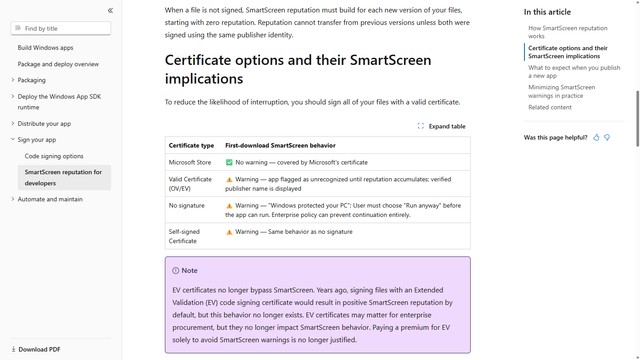
On 2026-09-21, Microsoft's page for app developers puts an unsigned file on its own row. That row says the warning is "Windows protected your PC", that the person must choose "Run anyway" before the app can run, and that an enterprise policy can prevent continuation entirely. A self-signed certificate is the same row. The 0.1.0 Windows setup published at releases.barionquant.com, file BarionQuant_0.1.0_x64-setup.exe, read NotSigned in Authenticode that same day.
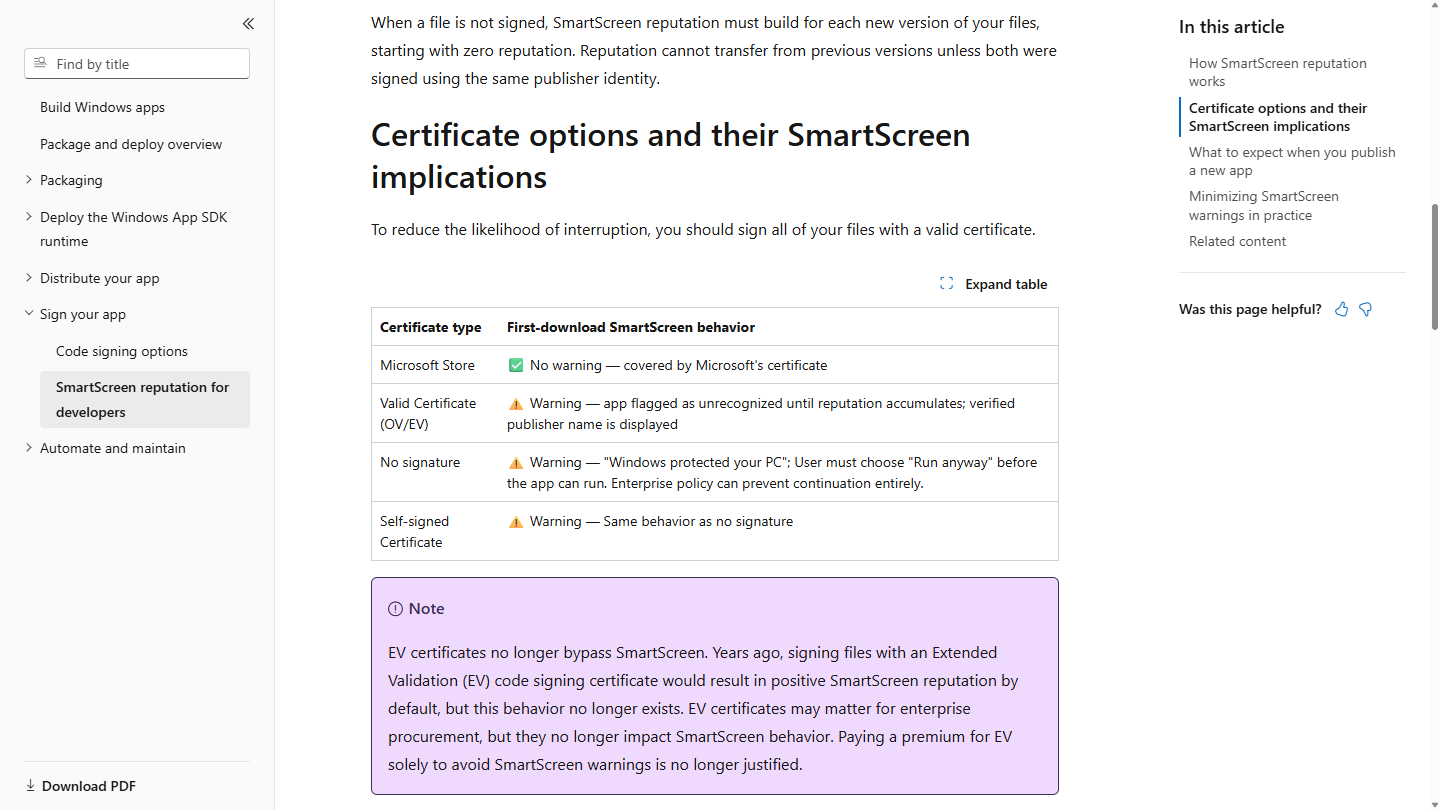
That row is a reputation prompt. It is not a lab report that the file is malware, and it is not a reason to turn SmartScreen off. The choice it names exists only for a file you already meant to run, and only when policy still allows the choice. The file has to be the one from the Download page on this site. A setup you found in a forum post does not borrow this paragraph.
Starting that same 0.1.0 file on the PC used for this check opened the setup wizard. The blue window did not open. The prompt is not guaranteed on every machine.
How to judge
Did the file come from the Download page?
The reputation page says an unsigned file starts with zero reputation, and that reputation does not carry from an older build unless both were signed with the same publisher identity. We have not signed 0.1.0. A later build, still unsigned, starts that count again. The only setup this paragraph is about is the one linked from Download.
Is the warning "unknown", or "known bad"?
The overview page separates two checks on a downloaded installer. One checks files against programs known to be unsafe, and shows a warning if it finds a match. The other checks files that are well known and downloaded frequently. If the file is not on that list, SmartScreen shows a warning, advising caution.
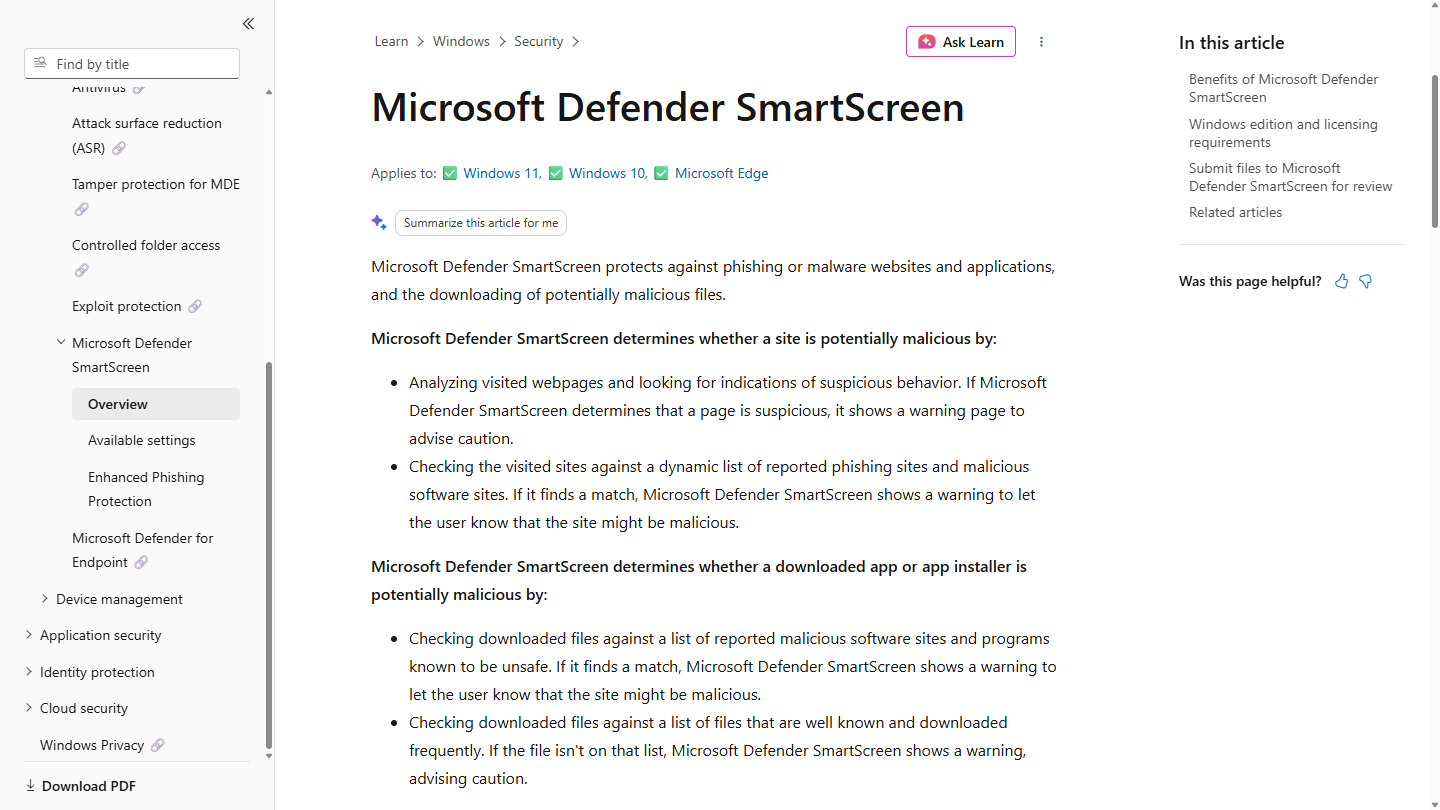
The same picture also covers suspicious websites. That half is not the installer. The half that matches a setup file is the pair above. An unsigned file that almost nobody has downloaded yet can miss the frequently downloaded list and still not be on the known-unsafe list. The table in the first picture is what that case looks like in their words: Windows protected your PC.
Their note under the table says an Extended Validation certificate no longer skips the warning. Paying for that certificate to make the blue window disappear is not what the page describes, and it is not something this desk has done.
Is a scanner blocking a plugin inside a terminal?
Soft4FX documents a different failure. The heading is "Could not start the simulator!" The next lines point at the Experts tab in the Toolbox. The paragraph after that says an antivirus or other security software may be blocking Forex Simulator, and then it suggests turning the antivirus off for a short while, or adding an exception, so you do not leave it off.
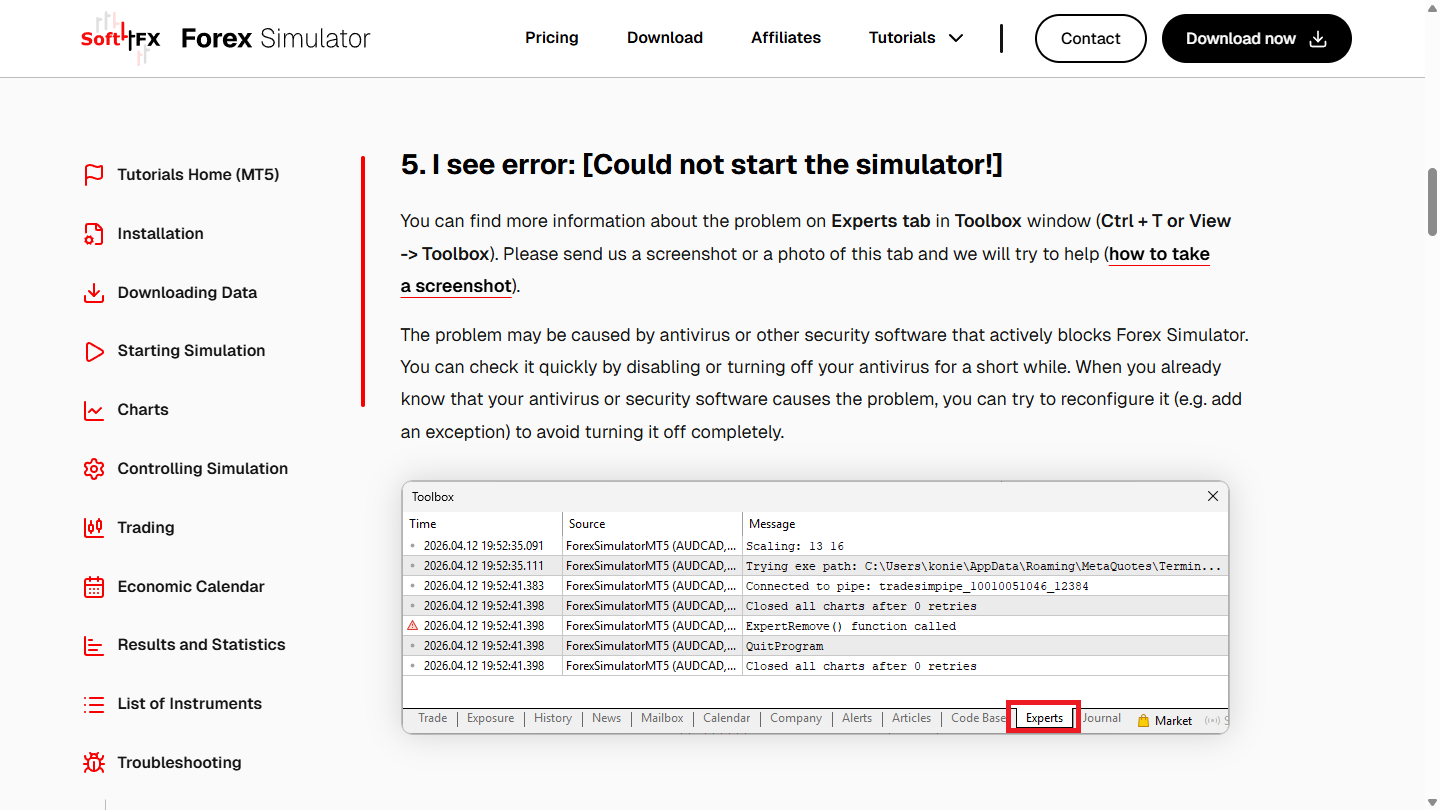
That suggestion stays on their page. This page does not turn it into steps. Leave the antivirus on. Leave SmartScreen on. A desktop setup that Windows has not seen often is not the same event as a plugin the scanner stopped inside MetaTrader. Mixing them produces the worst fix: security switched off, and the wrong program still the one you needed.
What we do
BarionQuant 0.1.0 for Windows is a local practice desk. The setup file checked on 2026-09-21 was unsigned. If the blue window appears, Microsoft's row is the description of that window. Confirm the download, then use the choice on the window Windows itself drew. If the choice is missing, a company policy may have removed it. That is an IT question, not a forum bypass.
The first sitting after the wizard is "Finish one replay sitting — then stop decorating." Treat the prompt as a system message, and ignore posts that sell a bypass. The page about practicing without a broker terminal is "Skip the MetaTrader install — or accept it." A plugin that has to live inside that terminal can be the thing an antivirus stops. This desk does not ask you to install that terminal first.
Who should skip
Skip this page if you need a click-path that turns SmartScreen or the antivirus off. It is not here. Skip it if the file did not come from the Download page. Skip it if the PC is managed and the window has no way forward. Ask the administrator. Do not collect bypass notes.
Also skip it if you wanted a Mac build. There isn't one. The session after install is a file on Windows, and it is still not a broker account.
FAQ
Is Windows protected your PC a verdict that the file is malware?
The overview page shows two different warnings. A match against programs known to be unsafe is one. A file that is not on the frequently downloaded list is the other, and that one advises caution. The developer table adds a third label for no signature: Windows protected your PC. Read the window you actually have. Do not collapse them into one sentence.
Should I turn SmartScreen off so the setup will run?
No. Their no-signature row describes a choice on that window. It does not describe a setting you should disable. An enterprise policy can remove the choice. Turning the feature off for every future download is a larger hole than one setup.
Is "Could not start the simulator" the same window?
No. That heading is on the Soft4FX troubleshooting page. The paragraph under it talks about an antivirus blocking the simulator, and about turning that protection off or adding an exception. Those are their words. They are not steps on this page. The blue window, when it appears, is about the setup file's reputation.
Will the blue window show on every PC?
It did not show on the PC where this 0.1.0 file was started on 2026-09-21. The wizard opened instead. Another PC, or a later unsigned build, can still show the row in the first picture.
Next step
Download the Windows build if you want the file this page is about. Open Pricing if you want the seat after that. If a security window appears, keep the protection on and match the file to the Download page before you use the choice Windows printed.
Educational content. BarionQuant is not a broker and does not provide investment advice or trade signals. Past practice results do not predict future outcomes. The Microsoft and Soft4FX pages were read on 2026-09-21.
Related reading

Finish one replay sitting — then stop decorating
5 min
After install, judge the first sitting by one finished local session — not themes, indicators, or Strategy Tester.
Skip the MetaTrader install — or accept it
6 min
Soft4FX starts after MetaTrader is already on the machine. If you will not install that terminal, you need a different desk — not a better plugin.