How to Practice Crypto Trading Offline: Local Binance Chart Replay
The bars are files on the PC. The seat decides which period you can step.
Direct answer
Crypto backtesting software offline means the month is already stored, and stepping does not open a live exchange socket. On this desk the files are Binance USD-M perpetual months. The app does not ask for a Binance API key.
Three checks before the product pitch:
- The month is on disk. The desk downloads a public archive and checks the SHA-256.
- The period matches the seat. Free is H1 and D1 for the latest published BTC and ETH month. One-minute bars are on Pro.
- You score the written rules on a month you can name. The paper balance stays out of the grade.
BarionQuant Desktop is that Windows practice desk. It does not route orders.
Why the weekend still needs a file
Crypto does not close on Friday. A browser chart still needs the network, and a one-minute month from May 2021 or November 2022 is a long file. Weekend crypto trading practice offline is the month you already stored, stepped on the machine, with the live book closed.
3 criteria for an offline crypto desk
1. No exchange API key
A public archive does not need a withdrawal-enabled key from Binance, Bybit, or Coinbase. This desk signs you in to read the plan. The download page says the app talks to api.barionquant.com for the account and the plan, and does not ask for broker logins or API secrets.
2. The period has to match the seat
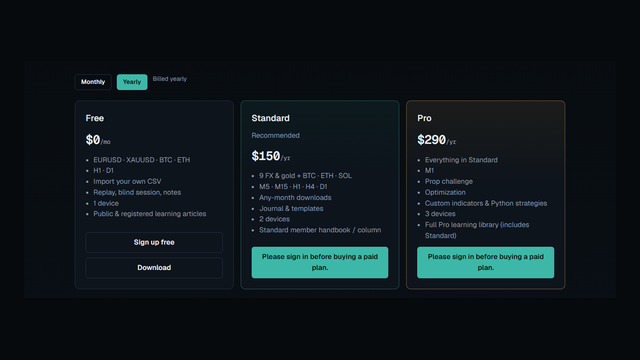
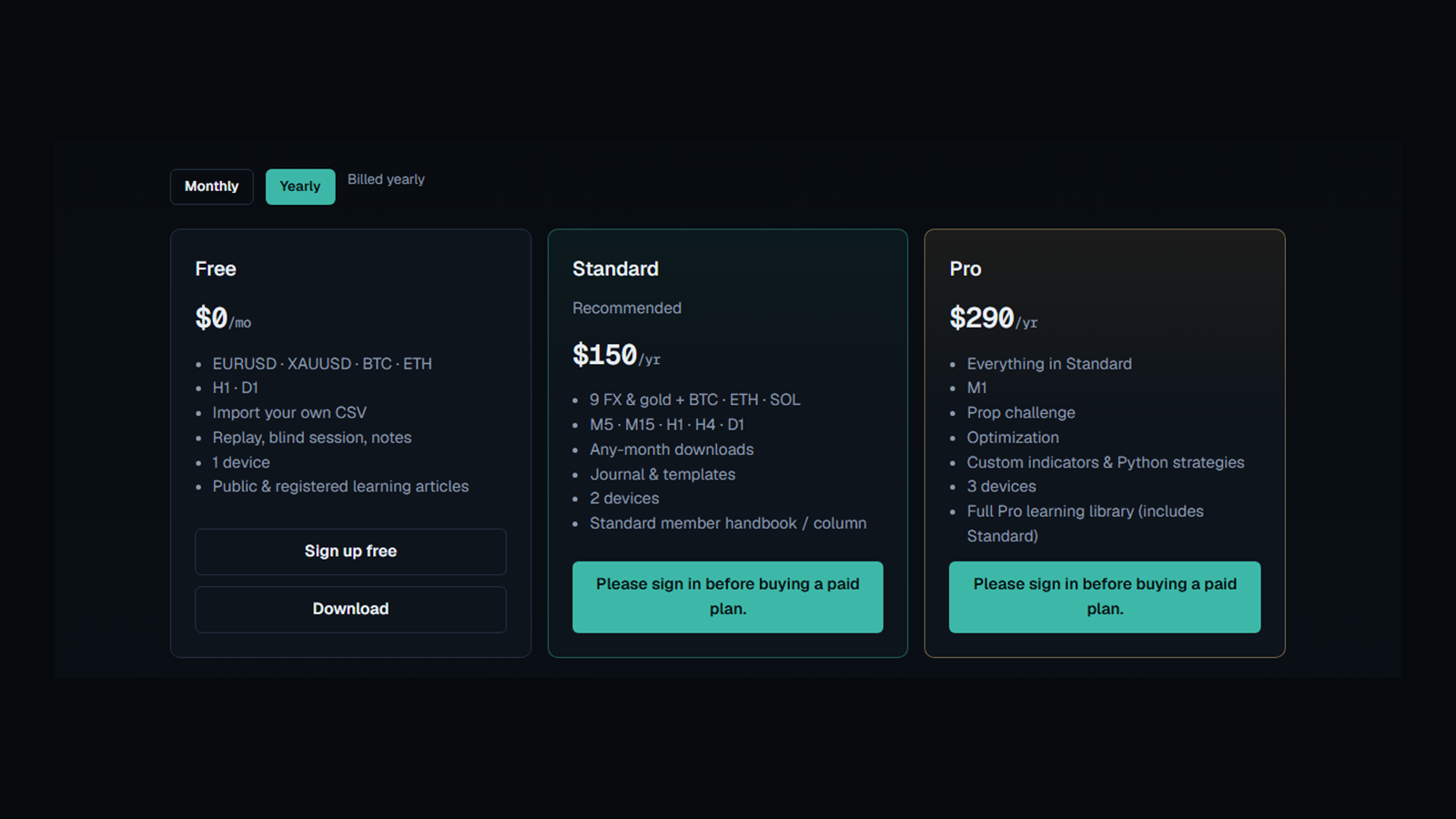
The yearly cards on the pricing page, with Yearly selected:
- Free, $0: EURUSD, XAUUSD, BTC, and ETH, on H1 and D1. The same page's download row says the free one-click history is EURUSD samples plus the latest published BTC and ETH month.
- Standard, $150/yr (or $15/mo on the other toggle): 9 FX and gold plus BTC, ETH, and SOL. Periods run M5, M15, H1, H4, and D1. Any-month downloads.
- Pro, $290/yr (or $29/mo): adds M1.
A binance chart replay tool that promises free one-minute scalping is describing the Pro seat, not the free one.
3. A named month, scored on rules
Open a month you can say out loud. May 2021. November 2022. Step it. Mark four checks: the entry matched the checklist, the stop sat at invalidation before the click, the risk fraction held, the exit followed the rule. A wide candle is a question for that list. This page does not invent a crash percentage.
What this desk does
BarionQuant is a Windows 64-bit practice desk. macOS and Linux builds are not published. It does not sell signals, bots, or a separate course. A paid seat includes the replay handbook.
Crypto history here is Binance USD-M perpetual one-minute months. The desk fetches the public archive, checks the SHA-256, and keeps the bars on the PC. That path is perpetuals, not spot, and not a tick or order-flow tape. The pricing page also lists importing your own CSV on every seat. That line is not a promise that every zip on the internet opens.
Sign-in reads the plan. After that, the download page says replay keeps working offline for up to 72 hours. Reconnect to refresh the plan. The files stay on the machine.
Manual crypto backtesting free, on this desk, is the latest BTC and ETH month on H1 and D1, plus the EURUSD and XAUUSD samples on the free card. SOL and older months are Standard and Pro. M1 is Pro.
A blind session draws a random 90–180 day window. You pick the period first. The name and the calendar stay hidden. Prices stay on the scale. Prop Challenge stays off for that session. One symbol stored on the PC can still give the pair away through the price.
Honest comparison
Prices below are public pages as of October 2026, plus the BarionQuant card dated 2026-09-14. The live pricing page in the picture matches that card on yearly billing.
Where it runs
- TradingView Bar Replay runs in the browser and needs the network.
- Forex Tester is a Windows desktop with its own data shop.
- FX Replay is a browser subscription.
- BarionQuant is a Windows desktop. macOS and Linux are not published.
Crypto history
- TradingView lists minute-level Bar Replay history as a plan limit: shorter on the entry paid plan, a full minute history on Premium. The chart still needs the network.
- Forex Tester sells crypto history as a data add-on. Check that store before you compare a pack price.
- FX Replay replays in the cloud for as long as the subscription is paid.
- BarionQuant stores Binance USD-M perpetuals on the PC. Free is the latest BTC and ETH month on H1 and D1. SOL and older months are paid. M1 is Pro.
Exchange key
- A replay of a public archive does not need your exchange key.
- BarionQuant does not ask for one.
Price
- TradingView's monthly card, in October 2026 write-ups of its pricing page, lists Essential at $14.95 and Premium at $69.95. Annual billing shows a lower per-month figure. Read the toggle you will actually pay.
- Forex Tester prices the software and the data packs separately.
- FX Replay sells a monthly browser plan. Read the current cart.
- BarionQuant: Free $0, Standard $15/mo or $150/yr, Pro $29/mo or $290/yr. The handbook is included with the seat.
Honest limit
- Windows only.
- Free has no M1 and no SOL.
- Perpetuals only. Not a spot book. Not a tick engine.
- A blind session with one symbol on disk can leak the pair.
- TradingView is the stronger live chart if you want the phone and the browser on the same layout. Forex Tester is the stronger forex tick archive. FX Replay is the path if you will not install a desktop app.
Who should skip
- You work on macOS, Linux, or a phone. This build is Windows 64-bit.
- You need spot, or one-minute bars on the free seat.
- You are writing a bot. Use a code framework for that.
- You want a coin call, a signal room, or a broker account. This page does not offer those.
Pictures on this page
Frequently asked questions
Can I replay a Binance month without the internet?
After the month is on disk and you have signed in, replay uses the local files. The download page says that continues for up to 72 hours, then the plan check wants a connection. The files stay on the PC.
Where do the bars come from?
Binance USD-M perpetual one-minute months from the public archive. The desk checks the SHA-256. The pricing page also lists CSV import. Bring a file you can describe. Do not assume every download from the internet will open.
Does blind mode work on BTC or ETH?
Yes, on a symbol the seat includes. The window is a random 90–180 days. The name and the calendar hide. Prices stay visible. Prop Challenge stays off. One stored symbol can still give the pair away.
Next steps
- Download BarionQuant for Windows (https://www.barionquant.com/en/download). The installer is Windows 64-bit. Free practice on crypto is the latest BTC and ETH month on H1 and D1.
- Read the transparent yearly seats (https://www.barionquant.com/en/pricing). Standard is $150/yr. Pro is $290/yr and adds M1.
- Read how to backtest without hindsight bias (https://www.barionquant.com/en/blog/how-to-backtest-without-hindsight-bias) for the blind-session rules.
- Read TradingView Bar Replay vs local desktop (https://www.barionquant.com/en/blog/compare-tradingview) and Soft4FX alternative for local replay (https://www.barionquant.com/en/blog/compare-soft4fx).
- Checklist detail lives in Learn (https://www.barionquant.com/en/learn).
Educational content. BarionQuant is not a broker and does not provide investment advice or trade signals. Cryptocurrency trading can lose the stake. Simulated replay does not predict live results. Competitor prices are public pages as of October 2026. BarionQuant prices are the 2026-09-14 card: Free $0, Standard $15/mo or $150/yr, Pro $29/mo or $290/yr.